
TL;DR: Some businesses can’t answer basic questions about who owns their domain, hosting, or digital accounts; and that gap costs them. A digital assets inventory documents every account, login, and subscription that powers your business online. It takes an afternoon to build and can save you days of recovery time when something goes wrong. We built two free tools to help you get started.
Most of the time, yes. But what happens when something changes — a team member leaves, you switch vendors, or you need to make an update and can’t find the login? The businesses that handle those moments smoothly are the ones who already have everything documented.
If you’ve never taken stock of what you own and who has access, this post is for you.
What Is a Digital Assets Inventory?
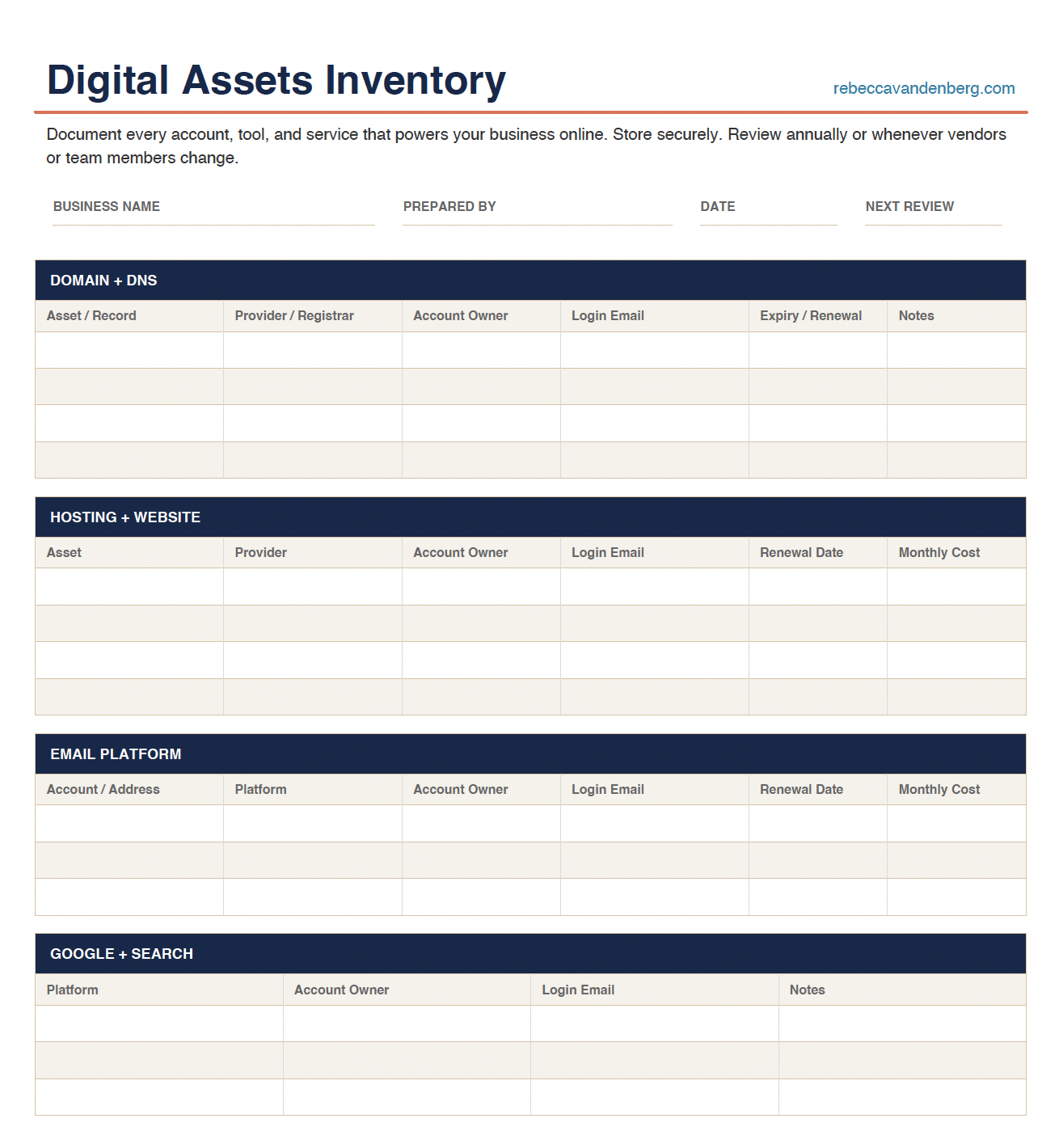
A digital assets inventory is a simple, organized record of every account, tool, and service that powers your business online. It’s the master document that answers three questions for every digital asset you have:
- What is it and who provides it?
- Who controls the login?
- What does it cost and when does it renew?
Think of it as the “keys to the castle” document. The one that lives in a safe place — not in your web developer’s head.
Why This Is More Urgent Than You Think
Scams are targeting business owners right now
If you own a domain, you’ve received them — official-looking invoices for “domain renewal” or “website listing services” from companies you’ve never heard of. They look real. They’re not.
These scams work because most business owners don’t actually know who manages their domain, what they pay for it, or when it renews. When you don’t know those details, a fake invoice is surprisingly easy to pay by mistake. When you have a documented inventory, those scams are immediately obvious.
Your business is probably paying for things you’ve forgotten about
Third-party plugins with annual licenses. A form tool from 2019. A stock photo subscription nobody uses. An SEO plugin from a vendor you switched away from two years ago. We see this constantly when we do website audits. One client was paying for three separate hosting accounts — one active, two forgotten.
A digital assets inventory surfaces all of it.
Employee transitions are a digital liability
When someone on your team — or a freelancer or agency — sets up accounts using their personal email or their own credentials, those accounts go with them when they leave. We’ve had clients come to us who couldn’t access their own domain registrar, their Google Business Profile, or their website admin because a former employee was the account holder.
Recovering access after the fact is expensive, time-consuming, and sometimes impossible.
What Should Be in Your Inventory?
Here are the categories every B2B business should document:
Domain and DNS
Your domain registrar, who owns the account, your nameservers, DNS records (including MX, SPF, DKIM, and DMARC for email), and your domain expiration date.
Website and Hosting
Your hosting provider and account details, your WordPress or other platform admin credentials, your SSL certificate, and any staging environments. Note: if your hosting is managed through a web partner or reseller, document who that is and how to reach them.
Email
Your email platform (Microsoft 365, Google Workspace, etc.), the account owner, all addresses on your domain, and renewal details.
Google and Search
Google Business Profile, Google Search Console, Google Analytics — who has admin access and under what account?
Social Media
Every platform your business uses, who the account owner is, and who has admin or publishing access.
Third-Party Tools and Subscriptions
Every plugin license, marketing tool, CRM, form builder, chat tool, or analytics platform that’s connected to your website or billed to the business.
The Ownership Rule That Protects You
The business owner holds master access. Everyone else gets delegate access.
Your domain registrar account should be in your name, on your email, with your payment method. If your hosting is managed through a web partner or reseller, you should know exactly who that is, what you’re paying, and how to reach them directly if something goes wrong — that relationship needs to be documented. Your Google Business Profile should follow the same rule as your domain: your name, your email, your account.
Your web team, IT partner, or agency should have access to do their job — but they should never be the primary account holder on anything critical.
This one rule protects you from vendor disputes, agency transitions, and the chaos that follows when something goes wrong at 2pm on a Friday.
Ready To Get Organized
If you’d rather have us run through it with you — and make sure everything is set up correctly — that’s exactly what our WordPress Care Plans include. We document your setup, verify access, and make sure the right people have the right credentials.
Frequently Asked Questions
How long does it take to build a digital assets inventory?
Most businesses can complete a basic inventory in one to two hours. The hard part is tracking down logins you don’t have handy. Your bank statements are a good starting point — look for any recurring charges tied to your website, email, or marketing tools and work backward from there.
Where should I store my digital assets inventory?
Somewhere secure and accessible to more than one person. A password-protected document in a shared folder works well. Some businesses keep a printed copy in a fireproof safe alongside other critical business documents. Do not store it in a regular email draft or an unprotected spreadsheet.
What if I don’t have access to some of these accounts?
That’s exactly why you need the inventory. Start by documenting what you do have access to, then identify the gaps. Many registrars and platforms have account recovery processes. If you’re working with a web agency, ask them directly which accounts are in your name versus theirs.
How often should I update my digital assets inventory?
Review it at least once a year, and any time a team member leaves, you switch vendors, or you add a new tool or subscription. A good rule of thumb: if anything in your digital setup changes, the inventory should be updated within a week.
Do I need a special tool to manage this?
No. A well-organized spreadsheet is all most businesses need. The interactive tool we built above is a good starting point. What matters is that it’s documented, accessible to the right people, and reviewed regularly — not which tool you use to store it.
