
TL;DR
WordPress websites need ongoing monthly maintenance to stay secure, backed up, and working correctly.
Without it, outdated plugins, missed backups, and undetected downtime can turn a small problem into a costly one.
In This Post
- Why WordPress Sites Break Down Over Time
- Why Are WordPress Sites Such a Common Target?
- What Does Monthly Maintenance Actually Include?
- DIY Website Maintenance Checklist
- What Does Website Downtime Actually Cost a Small Business?
- What It Feels Like When Someone Else Is Watching Your Site
- FAQ: WordPress Website Maintenance
- Final Thoughts
Every March 31, World Backup Day reminds website owners to check something they probably haven’t thought about since the site launched. WordPress website maintenance isn’t a one-time task. It’s a monthly discipline that keeps your site secure, fast, and working the way your business needs it to. This post covers what that actually looks like in practice.
Why Do WordPress Sites Break Down Over Time?
WordPress is not a “set it and forget it” platform. The core software updates. Plugins update. Themes update. And every update is a potential point of conflict, or a patch for a security vulnerability that attackers are already trying to exploit.
Most site owners don’t see this happening. The site looks fine on the surface. But under the hood, outdated software accumulates, backup configurations drift, and small issues go undetected until they become expensive ones.
The businesses that avoid major website problems aren’t lucky. They have a process.
Why Are WordPress Sites Such a Common Target for Hackers?
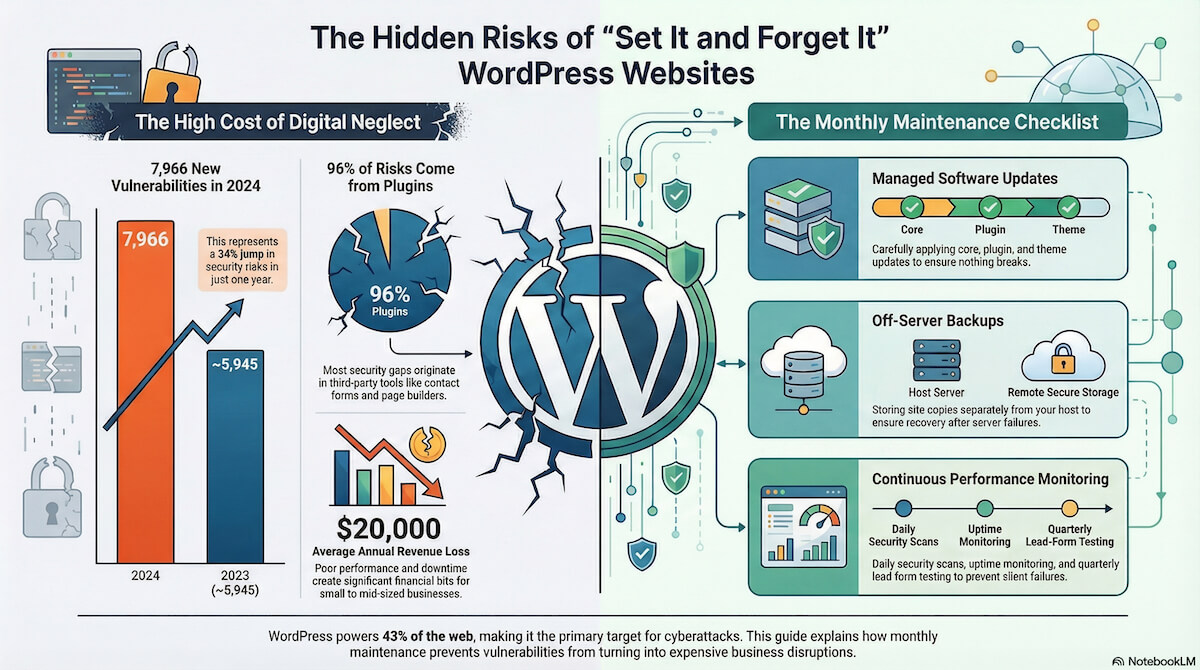
According to W3Techs, WordPress powers approximately 43% of all websites on the internet, making it the most targeted CMS by a wide margin.
Patchstack’s State of WordPress Security report found 7,966 new vulnerabilities across the WordPress ecosystem in 2024 — a 34% jump from the year before. Of those, 96% originated in plugins, not the WordPress core itself. The contact form your team uses. The SEO plugin. The page builder installed three years ago. Those are the entry points.
Wordfence’s 2024 Annual Security Report tells a similar story: over a third of those vulnerabilities had no patch available — meaning deletion was the only safe option for site owners who discovered them.
What Does Monthly WordPress Maintenance Actually Include?
Here’s what we complete every month for each of the 130+ websites we manage:
WordPress core, plugin, and theme updates. Applied carefully and monitored for conflicts. Not auto-updated and forgotten. Each update is checked to make sure nothing breaks.
Off-server backups. Your backup lives separately from your hosting environment. If the server is compromised or goes down, the site can be restored. World Backup Day is a good reminder, but this runs every month regardless of the calendar.
Security scanning. Our security setup is built to block threats before they reach your site. Daily scans check for malware and injected code — one layer of protection running quietly in the background.
Uptime monitoring. If your site goes down, we know within minutes, not hours, and not because a customer called to tell you.
Form and conversion testing. Every form gets a test submission every three months. A contact form that silently fails is one of the most common issues we find on sites that haven’t been actively maintained.
Google Analytics monthly report. A plain-language summary of how your site performed: traffic trends, top pages, where visitors came from. No login required.
Higher-tier plans include additional services like speed and Core Web Vitals testing, broken link scans, and hands-on edit hours each month.
Website Maintenance Checklist
How Does Your Site Stack Up?
Not sure if your current setup covers the basics? Run through this quick audit. You don’t need to be technical to answer most of these.
WordPress Site Health Audit
Updates
| Do you know what version of WordPress your site is running? | Yes | No |
| Are your plugins up to date? (Check Dashboard > Plugins) | Yes | No |
| Have any plugins shown an update notice for > 30 days? | Yes | No |
Backups
| Does your site have automated backups set up? | Yes | No |
| Are backups stored somewhere other than your hosting server? | Yes | No |
| Have you ever tested restoring from a backup? | Yes | No |
Security
| Has your site been scanned for malware in the last 30 days? | Yes | No |
| Do you know who has admin access to your dashboard right now? | Yes | No |
Performance & Forms
| Have you submitted a test form entry in the last month? | Yes | No |
| Do you know how your site loads on mobile? | Yes | No |
How did you do?
If you checked “no” or “I don’t know” more than a few times, your site has gaps. Not unusual for a business running on a lean team. But those gaps are exactly where problems start.
What Does Website Downtime Actually Cost a Small Business?
Most business owners don’t think about this until it happens.
Research from Liquid Web found that businesses experiencing website performance issues lose an average of $20,000 in revenue annually. For a small or mid-sized business, even a few hours of downtime during a busy period hits differently, especially if it happens during a promotion, a trade show follow-up window, or a season your business depends on.
The less visible costs are just as real. A hacked site can lose its Google rankings. An infected site can be flagged and blocked by browsers. A site that’s been down for hours looks unreliable to the next prospect who searches for you.
Prevention costs a fraction of recovery.
What Does It Feel Like When Someone Else Is Watching Your Site?
The marketing managers and business owners we work with aren’t thinking about plugin updates. They shouldn’t have to be.
What they care about is knowing it’s handled. That when a vulnerability gets disclosed, someone is already working on it. That their backup exists and can actually be restored. That their forms are working and their leads are coming through.
That’s what a care plan is. Not a line item on the budget. A system running quietly in the background so your website stays reliable while you focus on running your business.
FAQ: WordPress Website Maintenance
How often should a WordPress site be updated?
WordPress core, plugins, and themes should be reviewed and updated at least monthly. Security patches should be applied as soon as they are released, since attackers often target sites within days of a vulnerability being disclosed.
What happens if I skip WordPress maintenance?
Over time, outdated software becomes a security risk. Plugins with known vulnerabilities are actively targeted by automated bots. A site that isn’t maintained is also more likely to experience performance issues, broken functionality, and failed backups when something goes wrong.
Do I need a maintenance plan if my site doesn't get much traffic?
Yes. Hackers don’t target sites based on traffic. They target sites based on vulnerabilities. A low-traffic site running outdated plugins is just as exposed as a high-traffic one.
What is an off-server backup and why does it matter?
An off-server backup is a copy of your site stored in a separate location from your hosting environment. If your hosting account is compromised or the server fails, an off-server backup means your site can be fully restored. A backup stored only on the same server can be lost in the same incident.
What is included in your Growth Care Plan?
The Growth Care Plan at $249 per month includes all core monthly maintenance tasks including updates, off-server backups, security scanning, uptime monitoring, form testing, and a monthly Analytics report, plus two hours of hands-on edits each month.
Is website maintenance a one-time thing?
No. WordPress maintenance is an ongoing monthly process. New vulnerabilities are discovered every month, plugins release updates regularly, and your site needs consistent monitoring to catch issues before they become problems.
Final Thoughts
Your WordPress site is one of your most important business assets. Treating it like a one-time project is the fastest way to end up dealing with a crisis that costs far more than prevention ever would have.
Here’s a quick recap of what solid monthly maintenance covers:
- WordPress core, plugin, and theme updates applied carefully each month
- Off-server backups that can actually be restored
- Daily security scans for malware and injected code
- Uptime monitoring so you know within minutes, not hours
- Form testing every three months to make sure leads are actually coming through
- A monthly Analytics report in plain language
If you’re not confident that all of this is happening for your site right now, a free consultation is the right next step.
