
TL;DR — THE SHORT ANSWER
A 2026 blog post has 14 distinct elements — in a specific order — designed to satisfy both human readers and AI engines simultaneously. The biggest shift: your summary goes at the top, not the bottom. And without a credentialed author bio, AI engines will deprioritize your content entirely.
Most marketing teams are still writing blog posts the way they did in 2019. Strong intro, body sections, conclusion, maybe a CTA at the bottom. That structure made sense when Google was the only audience you were writing for.
That’s no longer true.
In 2026, your blog post has two audiences: human readers and AI engines. ChatGPT, Perplexity, Google’s AI Overviews, and Gemini are actively crawling, reading, and citing web content to answer user questions. If your post isn’t structured for both, it won’t rank in traditional search and it won’t show up in AI-generated answers — which is increasingly where your prospects are starting their research.
The good news: the changes aren’t radical. But they are specific. Here’s every element a modern blog post needs, in the order it should appear on the page.
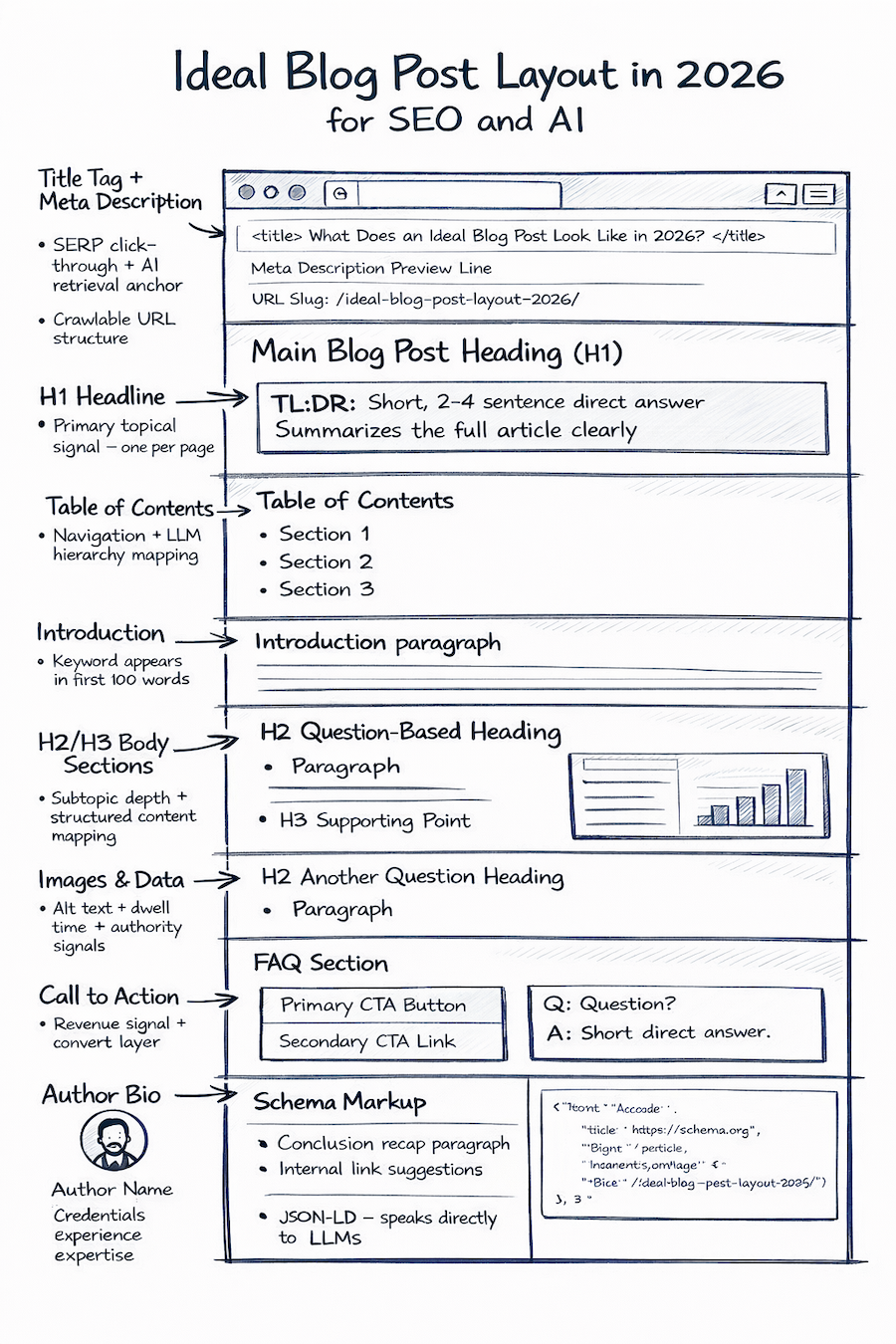
Before the Page: Meta & Technical Elements
These elements are invisible to readers but the first things Google and AI crawlers encounter. Getting them wrong is like having a great store with no sign out front.
01Title Tag — HTML <title>· SERP + AI Retrieval
The clickable blue link in Google results — separate from your H1, and often the first thing an AI uses to categorize your content.
- Lead with the primary keyword — don’t bury it after your brand name
- Frame it as a question or statement users would actually type
- Keep it under 60 characters to avoid truncation
- Never use “Blog | Company Name” — it tells Google nothing
02Meta Description· Click-Through Rate
This is ad copy, not a summary. Its only job is to earn the click.
- 140–160 characters — every word earns its place
- Include the primary keyword naturally
- Describe what the reader gets, not what the article is about
03URL Structure + Image File Names· Crawlability
Small details that add up over hundreds of pages.
- Short keyword-rich slug: /blog/ideal-blog-post-seo-2026/
- No dates, no stop words, no underscores
- Rename image files before uploading: seo-blog-structure.jpg
- Descriptive alt text on every image — AI engines read it
Every On-Page Element, In Exact Order
This is where the 2026 structure diverges most from what most teams are still doing. The order matters — AI engines are top-heavy readers. Their grounding plateaus at around 540 words.
04H1 — Main Headline· Primary Topical Signal
One H1 per page, phrased as a natural-language query so AI can retrieve it as a direct answer.
- Match or closely echo your title tag keyword
- Phrase it as a question or statement users would actually type
- Include “Updated [Month Year]” nearby — freshness matters to AI
05Table of Contents· Navigation + AI Anchoring
For any post over ~1,000 words, a TOC is table stakes. Helps LLMs understand your content hierarchy before reading the full piece.
- Use anchor links matching your H2/H3 headings exactly
- Use descriptive labels — not “Section 1” but “Why TL;DR goes at the top”
- Especially important for pillar posts and comprehensive guides
06Introduction· Keyword + Context Signal
2–3 sentences. Sets expectation, signals topical relevance, gets your primary keyword into the first 100 words.
- State what the post covers and who it’s for
- Weave in the primary keyword naturally
- Do not bury the lead — AI reads top-heavy and so do busy marketing managers
07Body — H2/H3 Sections Phrased as Questions· Core Content Depth
Your H2s and H3s should match how users search. Each should stand alone as a potential AI snippet.
- Answer “Why” and “Yes/No” questions directly under each heading
- Use HTML comparison tables for data — AI reads tables better than images
- Include internal links to relevant service and money pages
- Include outbound links to trusted sources — LLMs use these to verify answers
- Aim for ~540 words of direct grounding content
08Images, Visuals & Data· Dwell Time + Visual Authority
Original visuals are one of the few remaining human advantages — AI summaries can’t replicate them, forcing users to click through.
- Use diagrams, how-to visuals, custom charts, or original photography
- Always write descriptive alt text with natural keywords
- Use HTML tables for data comparisons, not screenshots
- Embed video where the topic is better shown than explained
09Call to Action· Revenue Signal
A blog post without a CTA is a branding exercise. Place it after the core content, before the FAQ.
- Link to your highest-intent service or contact pages
- Use action language: “Get your free audit” over “Learn more”
- One clear CTA here; a second is fine at the very end
10FAQ Section· Highest GEO Citation Trigger
This section has significant impact on AI visibility. AI engines pull FAQ content directly into AI Overviews and inline citations.
- 3–7 questions minimum, phrased as real user queries
- Answers under 60 words each, starting with a direct factual statement
- Target conversational queries your body sections don’t directly answer
Real-World Example: FAQ Citation in Google AI Overviews
Two weeks after launching a client site in mid-2025, a single FAQ answer was cited directly in a Google AI Overview for the search query “can you rent HP SitePrint?” — pulling Site Precision into the AI-generated result alongside established national rental companies.
No paid promotion. No domain authority built over years. Just a well-structured FAQ, answering a specific question the way a real user would ask it.
That’s the opportunity.

11Conclusion· Cluster + Internal Links
Recap key points in a skimmable format. Reinforce the primary keyword. Never let a page be a dead end.
- Use bullets or a short numbered list for the recap
- Link to 2–3 related pieces of content — cluster strategy
- Include a second CTA if the post is long-form
Why TL;DR Goes at the Top Now
This is the single biggest structural change from the old blog post formula — and most marketing teams haven’t made it yet.
The traditional TL;DR lives at the bottom of a post. It was borrowed from academic writing, meant as a convenience for readers who made it to the end. But AI engines don’t read to the end first. They read from the top, extract a direct answer, and move on.
The key insight:
“Why” questions have a 59.8% trigger rate for Google AI Overviews. If your direct answer is buried 800 words into the post, Google’s AI will find a competitor’s answer that’s at the top of their page instead.
Putting your TL;DR at the top does three things simultaneously:
- It feeds AI engines the answer immediately, making your page more likely to be cited in AI Overviews and ChatGPT responses
- It functions as the “Direct Answer Box” that AEO-optimized pages are built around
- It keeps human skimmers on the page — they get the summary, then decide whether to read the full piece
Format guidance:
1–3 sentences, plain language. If you use a visual callout box on the page (highlighted background, distinct border), even better — it signals to both readers and crawlers that this is the definitive answer.
The Full Page Order — Quick Reference
| # | Element | Primary Signal |
|---|---|---|
| 01 | Title Tag | SERP click-through + AI retrieval anchor |
| 02 | Meta Description | Click-through rate — written like ad copy |
| 03 | URL Slug + Image Names | Crawlability + keyword relevance |
| 04 | H1 Headline | Primary topical signal — one per page |
| 05 ★ | TL;DR (at the TOP) | Direct answer box — feeds AI Overviews |
| 06 | Table of Contents | Navigation + LLM content hierarchy |
| 07 | Introduction | Keyword in first 100 words |
| 08 | H2/H3 Body Sections | Subtopic depth + question-based headings |
| 09 | Images & Data | Dwell time + alt text + visual authority |
| 10 | Call to Action | Revenue signal — links to Convert Layer |
| 11 | FAQ Section | FAQPage schema — highest GEO trigger |
| 12 | Conclusion | Recap + internal link cluster |
| 13 ★ | Author Bio | EEAT signal — required for AI trust |
| 14 | Schema Markup | JSON-LD — speaks directly to LLMs |
★ Most commonly missing in content audits.
What to Stop Doing Immediately
Most of these aren’t controversial — just habits that made sense in 2020 and don’t anymore.
✕ Stop Doing This
- TL;DR at the bottom
- Generic “What is X” blog posts
- Skipping the author bio
- No FAQ section
- Title: “Blog | Company Name”
- Images for data tables
- Faceless, unattributed content
- Mass AI content, no human review
✓ Do This Instead
- TL;DR at the top — AI reads top-heavy
- Revenue-first Convert Layer pages
- Real photo + credentials + Person schema
- 3–7 FAQs with FAQPage schema markup
- Keyword-first, question-based title
- HTML tables — AI reads them better
- Named authors linked to credential pages
- Human-reviewed, original content
Frequently Asked Questions
Does every blog post need all 14 elements?
Short posts under 600 words can skip the Table of Contents and may not need a FAQ section. But the Title Tag, TL;DR, H1, Author Bio, and Schema are non-negotiable regardless of length. If you’re publishing content to rank, those five elements should be on every post.
How important is the author bio for SEO right now?
More important than most teams realize. Google’s EEAT guidelines have made author credibility a direct ranking factor for “Your Money or Your Life” topics, and AI engines are applying similar logic broadly. A named, credentialed author with linked bio and Person schema is table stakes for competitive topics in 2026.
Why does TL;DR at the top help with AI Overviews?
AI engines extract answers top-down. Content grounding — the process by which LLMs lock in reliable answers — plateaus at approximately 540 words. If your direct answer isn’t in the first section of the page, you’re competing against pages that put it there first.
What is FAQPage schema and how do I add it?
FAQPage schema is a JSON-LD code block that marks up your FAQ questions and answers in a machine-readable format. It signals to Google and AI engines that these are authoritative Q&A pairs eligible for direct citation. In WordPress you can add it manually with RankMath Pro, or if using blocks the plugin will generate it automatically when you use a FAQ block.
Is Your Current Blog Structure Built for 2026?
Most posts we audit are missing 4–6 of these elements. An SEO/GEO audit shows you exactly what’s costing you visibility — in both Google and AI search.